


🎉 Early Bird — 30% off all plans — Ends in 7d 20h 52m 29s · Code: EARLYBIRD30 Get the discount →
PDF Search Pro ⚡ The only WordPress PDF plugin with built-in OCR

Search inside every PDF.
Even scanned ones.

The only WordPress PDF plugin with built-in Google Vision OCR — no pre-processing, no extra tools. Just upload and search.

★★★★★ 5.0 on WordPress.org
100+ active installs
7-day money-back guarantee

WebEquipe PDF Search Pro is a WordPress plugin that indexes the full text of your PDF files — including scanned documents via Google Vision OCR — and makes them searchable through WordPress's native search and a dedicated shortcode form. Used by government sites, universities, membership portals, product documentation sites, and WordPress agencies.

Watch PDF Search Pro in 60 Seconds

Cloud OCR. Private visibility. Native search integration. Everything your PDF library needs.

★★★★★ "Perfect for websites with many PDF files" — WordPress.org
Used by
🏛️ Government Sites 🎓 Universities 🔒 Membership Portals 📋 Product Docs 💼 WordPress Agencies
The Problem

WordPress search ignores your PDFs.
We fix that.

Most plugins stop at text-based files. Scanned documents, archived forms, old meeting minutes — all invisible. PDF Search Pro indexes everything.

❌ Without PDF Search Pro

Default WordPress Search

  • Searches only page titles and post content — ignores everything inside PDFs
  • Scanned PDFs completely invisible — no text to extract from image-based files
  • Private documents indexed and visible to all visitors — no access control
  • No data on what visitors search for — flying blind on content gaps
  • Visitors give up and email your team — avoidable support load
✅ With PDF Search Pro

PDF Search Pro

  • Full-text search inside every PDF — content, not just filenames
  • Google Vision OCR indexes scanned PDFs automatically — no pre-processing needed
  • Private PDF search — member-only documents invisible to logged-out visitors
  • Analytics dashboard shows top queries and zero-result searches (your content gaps)
  • Visitors find what they need instantly — fewer emails, happier users
How It Works

How to Set Up WordPress PDF Search in Minutes

Install the plugin, run the first index, and every new PDF upload is handled automatically from that point forward.

01
Install & Activate

Install from WordPress.org or upload the Pro zip. Activate and go to Settings → PDF Search.

02
Index & OCR

Click Re-index All PDFs. Text PDFs are indexed instantly. Scanned PDFs are sent to Google Vision OCR automatically.

OCR — Pro feature
03
Control Access

Exclude private PDFs from search or mark them as Private — invisible to logged-out visitors only.

04
Search & Find

Add the shortcode to any page. Visitors search and find PDF content with title, excerpt, file size, and page count.

Pro Feature — OCR

The only WordPress plugin that searches inside scanned PDFs

Every other plugin stops at text-based files. If a PDF was scanned from a physical document — old meeting minutes, archived forms, historical records — no other plugin can index it. We built Google Vision OCR directly in. Upload a scanned PDF. It gets indexed. That's it.

✓ No pre-processing required ✓ 50+ languages supported ✓ Auto-detects on upload
OCR Pages Included per Month
Starter1,000 pages
Pro3,000 pages
Agency10,000 pages
❌ Without OCR
PDF
Annual_Report_2024.pdf
Text-based PDF
✓ Indexed
PDF
Meeting_Minutes_2019.pdf
Scanned document
✗ Invisible
PDF
Policy_Archive_2018.pdf
Scanned document
✗ Invisible
✅ With OCR (Pro)
PDF
Annual_Report_2024.pdf
Text-based PDF
✓ Indexed
PDF
Meeting_Minutes_2019.pdf
Scanned document
✓ OCR'd
PDF
Policy_Archive_2018.pdf
Scanned document
✓ OCR'd
Features

PDF Search Pro Features

From basic text search to OCR, private access, and analytics — everything is built in.

Starter+
🔍

OCR for Scanned PDFs

Google Vision reads scanned and image-based PDFs automatically. Upload and it's indexed — no pre-processing, no extra tools, no manual steps.
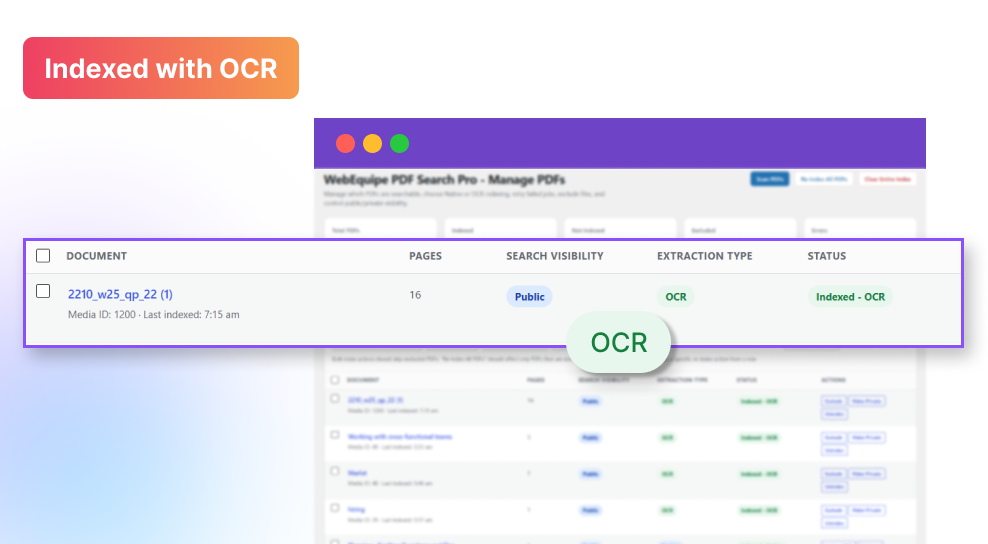
Media Library OCR status
Pro+
🔒

Private PDF Search

Mark any PDF as private. It becomes completely invisible in search for logged-out visitors — perfect for member handbooks and restricted resources.
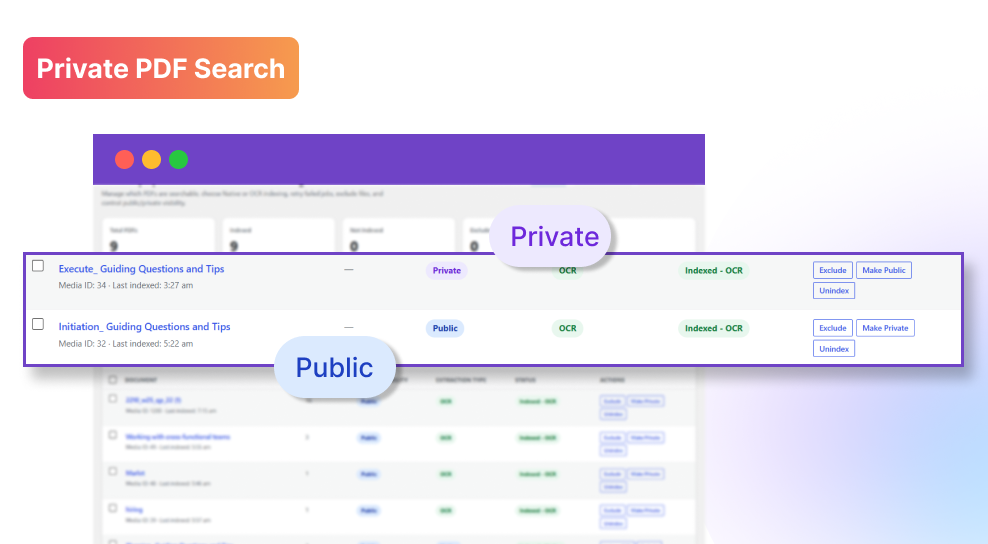
Private PDF media library status
Pro+
📊

Analytics Dashboard

See what visitors search for — and what they can't find. Zero-result searches are your content gap list. Pure signal, zero noise.
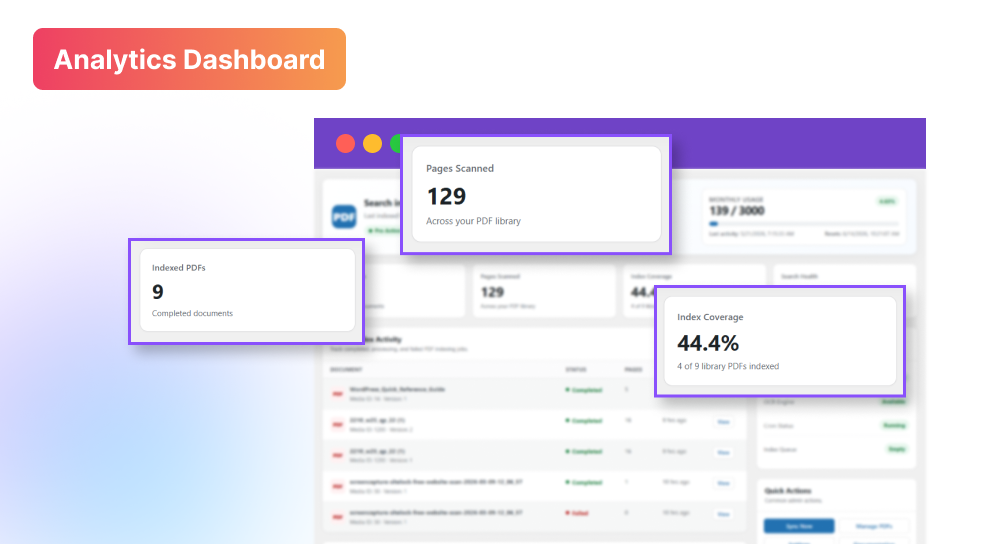
Analytics dashboard preview
Pro+
🔑

Password-Protected PDFs (Coming Soon)

Enter the PDF password once in settings. The content becomes fully searchable while the file stays protected for direct access.

Starter+
🎛️

Advanced Search Filters

Filter by date, file size, page count, category, and author. Active filters shown as dismissible chips. Filter state saved in URL for shareable searches.

Agency
🏷️

White-Label Mode

Replace WebEquipe branding with your own agency name, logo, and support URL. Deliver it as your own product to every client.

Who Uses It

Built for document-heavy WordPress sites

If your visitors need to find information inside PDFs, this plugin was built for your use case.

📋

Product & Docs Sites

Make manuals and spec sheets searchable — including legacy scanned documents

🎓

Universities & Schools

Index course catalogs, student handbooks, and scanned archived policies

🔒

Membership Sites

Private member docs stay private. Scanned minutes become searchable.

🏛️

Government & Nonprofits

Make decades of scanned public records searchable without rebuilding your archive

💼

WordPress Agencies

One Agency license, unlimited clients, white-label — deploy in under 10 minutes

See Every Feature — Complete Walkthrough

Dashboard, Settings, Manage PDFs, OCR indexing, private visibility, and search results — all covered.

Still have questions? Visit our support page →
Pricing

Choose the right plan for your PDF search needs

Start free, then upgrade when you need OCR, analytics, WooCommerce, membership integrations, or more site licenses.

Monthly Annual Save up to 26%
Free
$ 0 /mo
Free forever
Free forever
Single Site
Community Support
Free forever
Download Free Plugin →
  • Full-text PDF search
  • Auto indexing on upload
  • Shortcode search form
  • Bulk index & exclude
  • WordPress Multisite
Starter
1,000 OCR Pages · Single Site
Normally $9/mo
$ 7 /mo
Billed $89/yr — save 18%
Billed $9/month
Single Site
Email Support
$89 / year

  • 1,000 OCR pages/month 1,000 pages/month via Google Vision
  • Auto OCR on Upload scanned PDFs detected and indexed automatically
  • OCR Usage Meter Shows your monthly OCR page usage and remaining quota at a glance.
  • PDF-Only Search Mode Search returns PDFs only — no posts or pages mixed in the results
  • Advanced Search scanned PDFs detected and indexed automatically
  • Analytics Dashboard see top queries, content gaps, most-clicked PDFs
  • Shortcode Search Form Add a dedicated PDF search box anywhere on the site using one shortcode
Agency
10,000 OCR Pages · Unlimited Sites
Normally $59/mo
$ 44 /mo
Billed $529/yr — save 25%
Billed $59/month
Unlimited Sites
Email Support
$529 / year

  • 10,000 OCR Pages/Month 10x more OCR capacity than Starter
  • Private PDF Search member-only PDFs invisible to logged-out visitors
  • Auto OCR on Upload scanned PDFs detected and indexed automatically
  • OCR Usage Meter Shows your monthly OCR page usage and remaining quota at a glance.
  • PDF-Only Search Mode Search returns PDFs only — no posts or pages mixed in the results
  • Advanced Search scanned PDFs detected and indexed automatically
  • Analytics Dashboard see top queries, content gaps, most-clicked PDFs
7-day money-back guarantee No credit card for free plan Cancel anytime Free plugin always free
Full Comparison

Compare all features

A complete breakdown of what is included in each plan.

Feature Free Starter Pro ⭐ Agency
Core Search
Full-text PDF Search
Auto Indexing on Upload
Shortcode search form
Rich results (icon, size, excerpt)
Exclude / Include system
Background processing
WordPress Multisite
OCR — Scanned PDF Support
OCR for scanned PDFs (Google Vision)
OCR pages per month 1,000 3,000 10,000
Auto OCR on upload
Bulk OCR scan
Password-protected PDF indexing Upcoming
Advanced search filters Upcoming
Pro & Agency Features
Private PDF search (logged-in only)
Analytics dashboard
Custom search result layouts Upcoming
Number of sites 1 1 5 Unlimited
Agency Exclusive
White-label mode
Unlimited sites
Dedicated support channel
Support
Community support
Email support
Priority support
Price Free From $89/yr From $169/yr From $529/yr
Real Reviews

What WordPress users say

★★★★★ 5.0 out of 5 · Read all reviews on WordPress.org →
★★★★★

"Perfect for websites with many PDF files. It makes searching inside documents very easy for visitors."

I
iftekharsiam109
Verified on WordPress.org
★★★★★

"Really useful plugin. Exactly what I needed to make my document library searchable. Works perfectly."

W
WordPress User
Verified on WordPress.org
FAQ

Frequently Asked Questions About WordPress PDF Search

WebEquipe PDF Search Pro is a WordPress plugin that indexes the full text of your PDF files and makes them searchable on your site. It works with both standard text-based PDFs and scanned documents — scanned PDFs are processed automatically using Google Vision OCR on all paid plans. Visitors search using WordPress's native search bar or a dedicated shortcode form, and results show the PDF title, a matching excerpt, file size, and page count.
Yes — on Starter, Pro, and Agency plans. Scanned PDFs are sent to Google Vision OCR automatically on upload. The extracted text is stored in your WordPress database and becomes fully searchable. No pre-processing, no third-party tools, no manual steps. The free plan supports text-based PDFs only.
No. Default WordPress search only reads post titles and page content. It ignores everything inside uploaded PDF files — body text, headings, tables, and data. Without a dedicated plugin, a visitor searching for a policy name, course code, or model number inside your PDFs will get zero results even if the answer is right there in a document.
No. Indexing runs entirely in the background using WordPress cron — visitors are never affected. Large PDFs are queued for background processing. Search queries run against a pre-built index and return results in milliseconds. There is zero impact on page load time.
Use Exclude to permanently keep a PDF out of all indexing — it stays in your Media Library but never appears in search, even after a full re-index. Use Private (Pro and Agency plans) to keep a PDF indexed but invisible to logged-out visitors — useful for member handbooks and restricted resources. Both are managed from the Media Library or Manage PDFs screen.
The plugin is used by government and council sites (meeting minutes, agendas, public records), universities and schools (course catalogs, student handbooks, policy PDFs), membership associations (bylaws, forms, restricted member resources), product and documentation sites (manuals, spec sheets, installation guides), legal and compliance teams (policy and regulatory documents), and WordPress agencies managing document-heavy client sites.
SearchWP and Relevanssi are full site-search suites covering posts, custom post types, and WooCommerce. WebEquipe PDF Search Pro is purpose-built for PDF search only. It costs less, installs faster, and includes built-in Google Vision OCR for scanned PDFs — a capability neither competitor offers natively.
Not yet. Password-protected PDF indexing is on the roadmap. Currently the plugin cannot read encrypted PDF content. Remove the password from the file first, then re-upload — the content will index normally.

Ready to make your PDFs
searchable today?

Install the free plugin in 2 minutes. Upgrade to Pro when you need OCR, private search, or analytics.