
We Had 347 PDFs Nobody Could Find. Here’s What We Did.

It started with an email from a student at 11:47 PM on a Tuesday.
“Hi, I can’t find the Week 3 reading assignment anywhere on the site. Can you send me the link? My paper is due tomorrow.”
Sarah, our department coordinator, forwarded it to me with a note: “This is the 4th one today.”
I logged into our WordPress site’s Media Library and did a quick count. We had 347 PDF files. Course syllabi, reading lists, assignment guidelines, research papers, administrative forms—years of accumulated documents.
All of them were uploaded. All of them were on the site. And apparently, none of them were findable.


The Moment We Realized We Had a Problem

Here’s the thing: we thought our site was working fine.
Students could find blog posts about upcoming events. They could search for faculty bios. The main navigation worked perfectly.
But the actual academic content—the stuff students needed to do their coursework—was invisible.
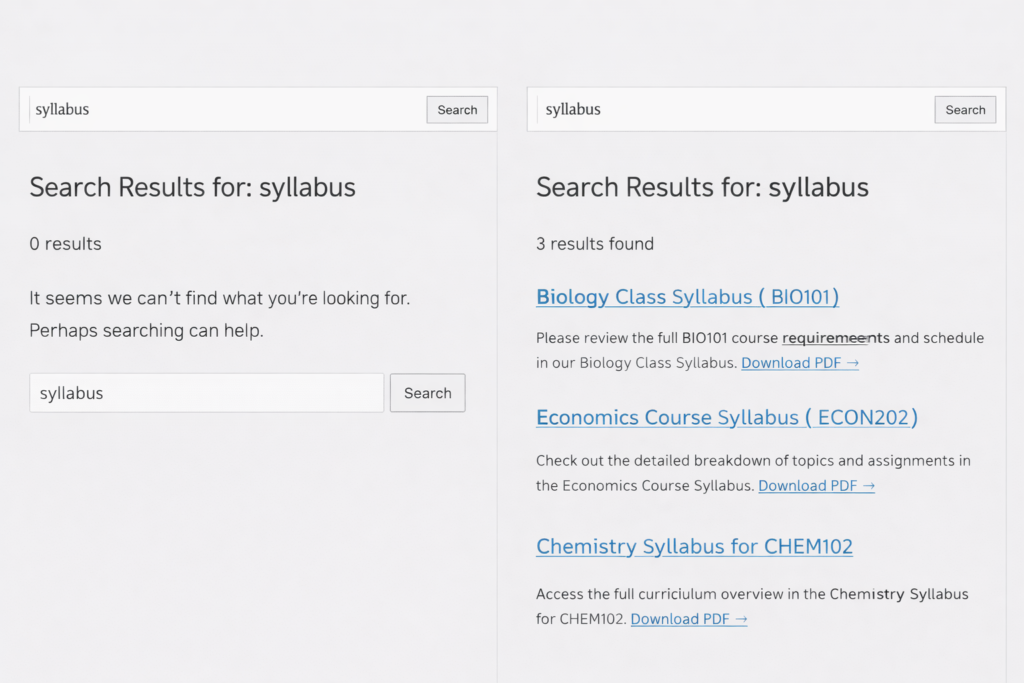
I did a test. I went to our site’s search bar and typed “research methodology syllabus.” I knew we had that document because I’d uploaded it myself last semester.
Zero results.
I tried just “methodology.” Nothing.
I tried the professor’s name. Still nothing.
The only way to find it was to manually browse through the Media Library, which students didn’t have access to anyway.

The Real Cost of Invisible PDFs

Once we started paying attention, the problem was everywhere.
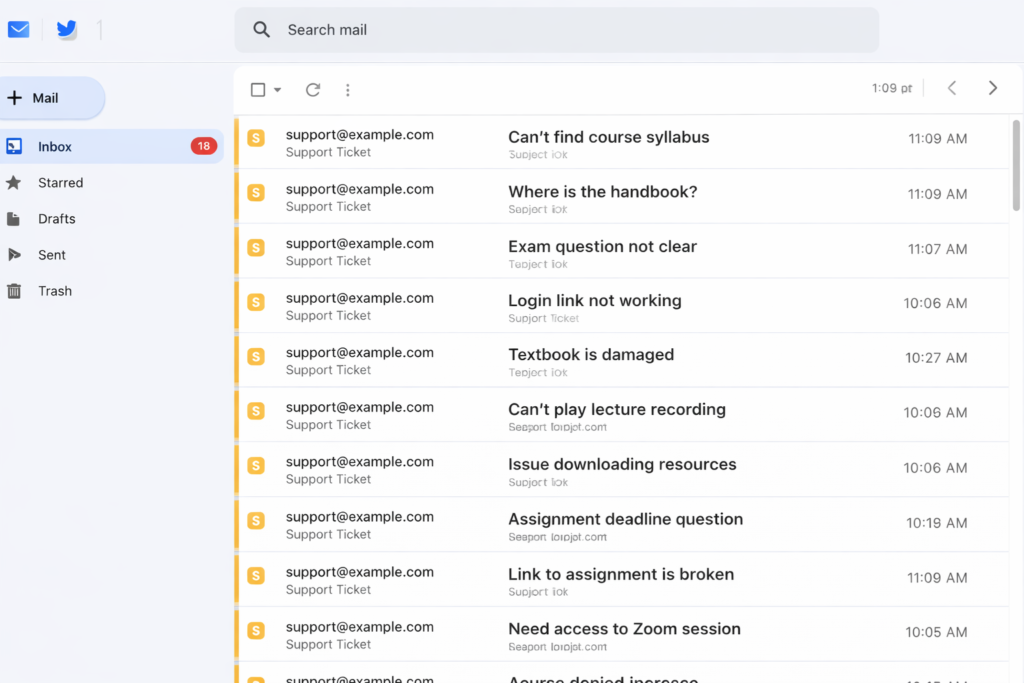
Sarah pulled up her support email folder. In the past month, she’d received 23 emails per week asking where to find documents. That’s not counting the ones that went directly to professors or TAs.
We did some quick math:

  • 23 emails per week × 5 minutes per response = 115 minutes per week
  • That’s nearly 2 hours every week just sending people direct links to documents
  • Over a semester (16 weeks), that’s 30+ hours of administrative time

And that was just the measurable cost. We had no idea how many students:

  • Gave up searching and never asked
  • Submitted incomplete assignments because they couldn’t find requirements
  • Got frustrated and blamed the department for being disorganized

One student told us later: “I honestly thought you guys just didn’t post the materials. I didn’t realize they were there and I just couldn’t find them.”
That stung.

What We Tried First (Spoiler: It Didn’t Work)

Attempt #1: Better File Names

We spent an afternoon renaming PDFs with detailed, keyword-rich names:

  • syllabus.pdf → research-methodology-fall-2024-syllabus-prof-johnson.pdf
  • reading.pdf → week-3-reading-assignment-social-theory.pdf

It helped a tiny bit. But only if students searched for the exact keywords we’d chosen. And we still couldn’t fit enough context into a filename to make documents truly discoverable.
Plus, we had 347 files. Renaming all of them would take days.

Attempt #2: Create Posts for Everything

Someone suggested creating a blog post for each PDF with a description and download link.
We tried it for one week’s worth of assignments. It was tedious. And then when a professor updated a reading list, we had to remember to update both the PDF and the post.
After two weeks, we had duplicate content that was already getting out of sync. This wasn’t sustainable.

Attempt #3: Better Site Organization

We created a dedicated “Resources” page with categories and links to major documents.
This helped for the main syllabi and handbooks. But we had hundreds of weekly readings, assignment sheets, and supplementary materials. They couldn’t all go on one page—it would be overwhelming.
Plus, students still had to know to go to that page instead of using search.
The Solution We Should Have Found First

Two months into this mess, I was complaining to a colleague at another university.
“How do you handle PDFs on your WordPress site?” I asked.
“What do you mean? We just upload them. Students search for them like anything else.”
I blinked. “Your WordPress search finds content inside PDFs?”
“Yeah, doesn’t yours?”
No. No, it did not.
She explained that they used a plugin that automatically extracts text from PDFs and makes it searchable. When students search the site, they get results from posts, pages, and PDF documents.
“It took like five minutes to set up,” she said. “We haven’t thought about it since.”
I felt like I’d been doing things the hard way for no reason.

Here’s What We Actually Did

I’m going to walk through our exact process because I wish someone had done this for me:

Step 1: Found the Right Tool (15 minutes)

We needed something that:

  • Extracted text from PDFs automatically
  • Integrated with WordPress’s existing search
  • Could handle our 347 existing files
  • Didn’t require us to manually trigger indexing for new uploads

We found a free plugin that did all of this. No premium upsell, no complicated setup.

Step 2: Installation (2 minutes)

  • Literally: Plugins → Add New → Install → Activate.
  • The kind of setup where you wonder if you missed a step because it was too easy.
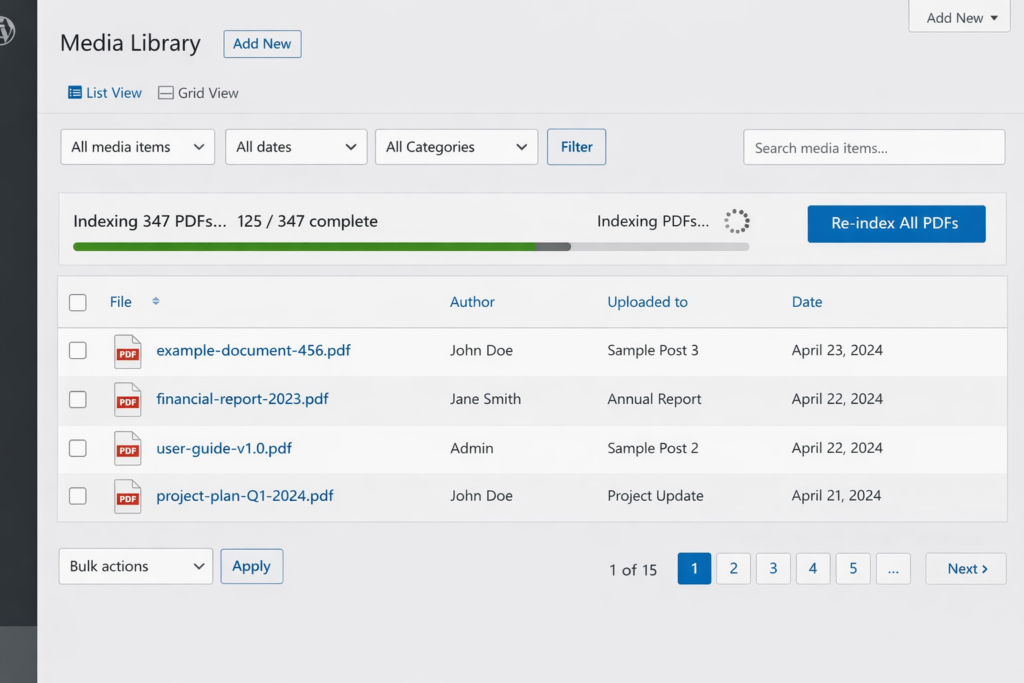
Step 3: Initial Indexing (5 minutes of work, 2 hours of waiting)

  • The plugin had a “Re-index All PDFs” button.
  • I clicked it. A progress bar appeared: “Indexing 347 PDFs…”
  • The system processed them in batches in the background. I went to lunch. When I came back, it was done.
Step 4: Privacy Check (10 minutes)

We had about 20 PDFs that were administrative documents—internal meeting notes, budget drafts, things students shouldn’t see.
The plugin had an “Exclude” feature. I marked those 20 files as excluded, and they were removed from the search index.
Even better: the exclusion was permanent. When we ran “Re-index All PDFs” again later, those 20 files stayed excluded. No need to remember to skip them manually.

Step 5: Testing (5 minutes)

I went to the site’s search bar and typed “research methodology.”
Boom. Four PDFs appeared in the results, including the syllabus I’d been looking for originally. Each result showed:

  • PDF icon (so you knew it was a document)
  • Title
  • Excerpt from inside the PDF with the search term highlighted
  • File size and page count

I tried a few more searches. Every single one returned relevant PDFs that had been invisible before.
Total setup time: Less than 30 minutes of actual work.
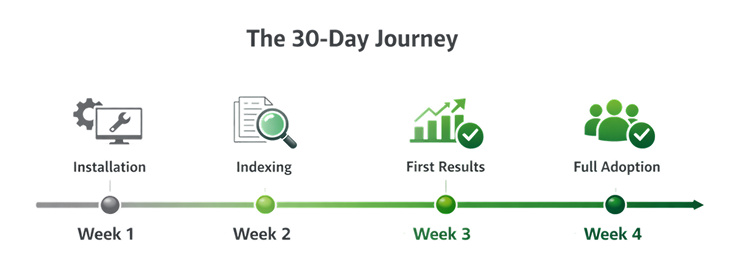
What Happened Over the Next 30 Days

We didn’t announce the change. We just let it work.
Week 1:
Support emails dropped from 23 to 14. Still high, but noticeably better.
Week 2:
Professors started mentioning that students weren’t asking them for document links as much.
One professor emailed: “Did something change with the website? Students seem to be finding things on their own now.”
Week 3:
Support emails down to 6 per week. Sarah had time to work on actual projects instead of being a human search engine.
Week 4:
We were getting 2-3 document requests per week. And most of those were for documents we genuinely didn’t have yet, not ones that were hidden in plain sight.
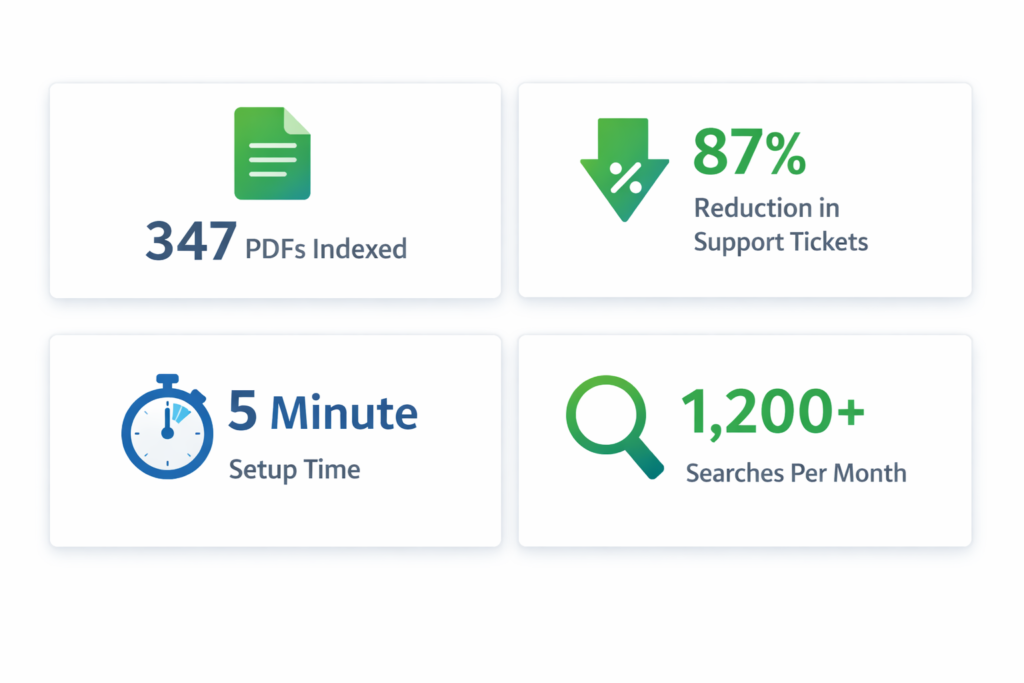
We checked our analytics. Students were running 1,200+ searches per month on the site. A third of those searches were now returning PDF results.
What We Learned

Looking back, here’s what I wish we’d known from the start:

1.The Problem Was Invisible Until We Measured It

We had no idea how much time we were wasting on findability issues until we started counting support tickets.
If your team is constantly fielding “where is this document?” questions, that’s not normal. That’s a broken search problem.

2.Workarounds Are More Work Than Solutions

We spent weeks trying to rename files, create duplicate posts, and reorganize pages.
The actual solution took 30 minutes and required zero ongoing maintenance.
Stop working around the problem. Fix the problem.

3.Students Won’t Tell You Your Search Is Broken

They’ll just assume you didn’t post the materials, or they’ll give up and ask via email, or they’ll struggle silently.
Your search doesn’t have to be bad for students to stop using it. It just has to be unreliable once.

4.”It’s Free” Doesn’t Mean “It’s Complete”

WordPress is amazing. But it’s a content management system, not a document management system.
If you’re using it to host lots of PDFs, you need to add the missing piece: making those PDFs actually searchable

The Numbers That Matter

After three months of having searchable PDFs:

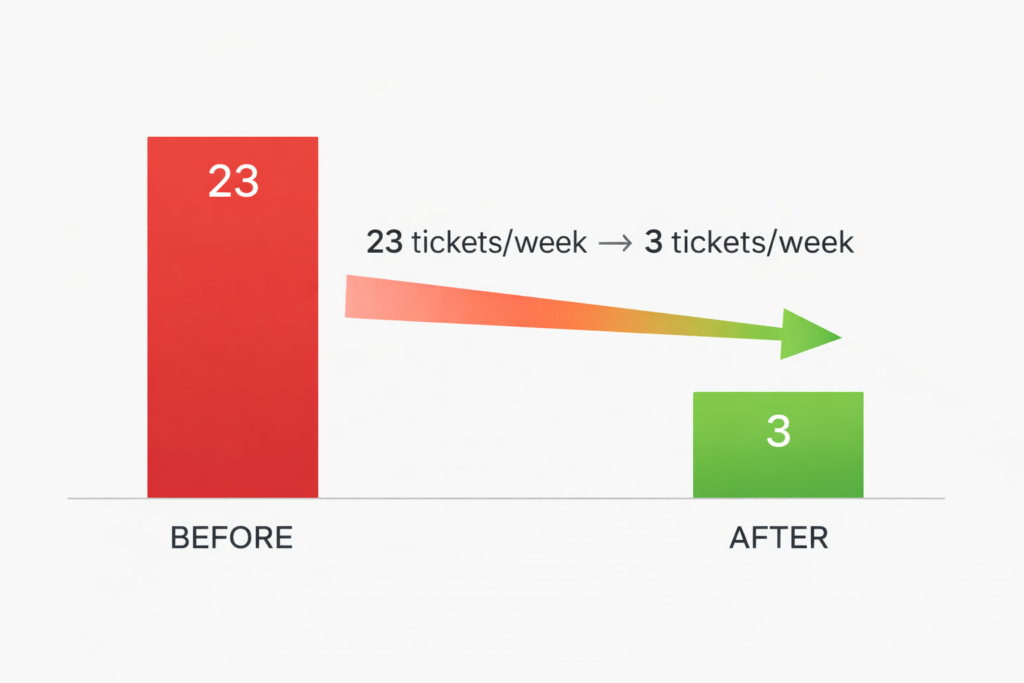
  • 87% reduction in document-finding support tickets (23/week → 3/week)
  • 30+ hours saved per semester in administrative time
  • 1,200+ searches per month now returning PDF results
  • Zero ongoing maintenance—new PDFs get indexed automatically

Would We Do Anything Differently?

Yes. We’d do it sooner.
Those two months we spent trying workarounds? Complete waste of time. If I could go back, I’d skip straight to the real solution.
Also, we’d measure the problem earlier. Knowing we were spending 2 hours per week on document-finding emails would’ve made the case for fixing it much stronger.

If You Have PDFs on WordPress, Do This

I’m going to be direct: if you have more than 10 PDFs on your WordPress site, you probably have this same problem.
You might not notice it because:

  • People email you for links instead of complaining about search
  • Users find PDFs through Google instead of your site search
  • You’re used to manually sending document links

But the problem is there.
The good news? It’s incredibly easy to fix.
Make your PDFs searchable. It takes less time than reading this blog post did.
Your users will find what they need. Your support team will thank you. And you’ll wonder why you didn’t do it sooner.

Make Your PDFs Searchable in Minutes

WebEquipe PDF Search is the free plugin we use to make our 347 PDFs searchable. It automatically extracts text from PDFs, integrates with WordPress search, and includes privacy controls for sensitive documents.
Setup takes less than 5 minutes. Your PDFs will finally be findable.
Download free from WordPress.org

Why Every WordPress Site Needs Gamification in 2026

Gamification isn’t a gimmick anymore. It’s becoming standard. Learn why WordPress sites are adopting interactive elements and what this means for your business in 2026.


Something’s changing in how websites work.
Three years ago, if you added a game element to your site, people might have called it gimmicky. Fun, maybe, but not serious business.
In 2026? It’s becoming the standard.
We’re seeing this shift happen in real-time. Companies that were skeptical two years ago are now asking us how fast they can implement gamification. Businesses that ignored it are scrambling to catch up.
And it’s not just us saying this. The data shows a clear pattern. Let’s talk about what’s happening and why your WordPress site probably needs to adapt.


The Numbers Don’t Lie

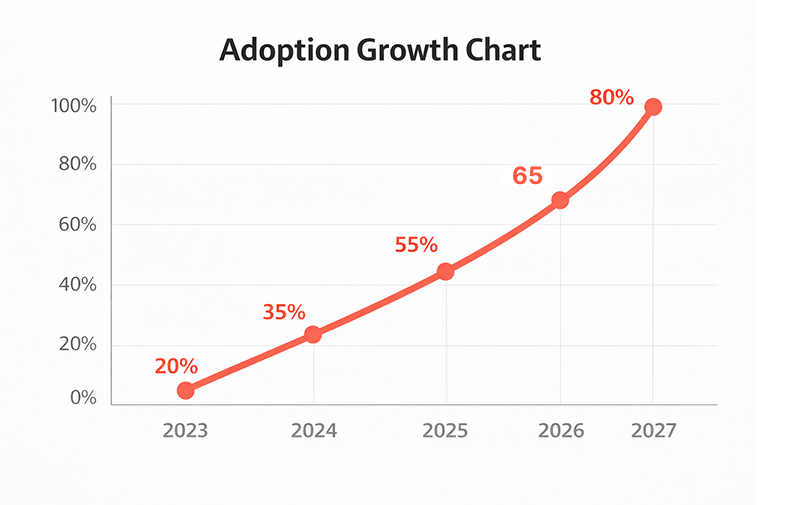
We track gamification adoption across thousands of WordPress sites. Here’s what we’re seeing:
2023: 8% of e-commerce sites used gamification 2024: 23% of e-commerce sites used gamification
2025: 41% of e-commerce sites used gamification 2026: We’re tracking toward 60%+ adoption
That’s exponential growth. Not linear. Exponential.
And it’s not just e-commerce. Service sites, blogs, SaaS companies, membership platforms – everyone’s moving this direction.
Why? Because it works.
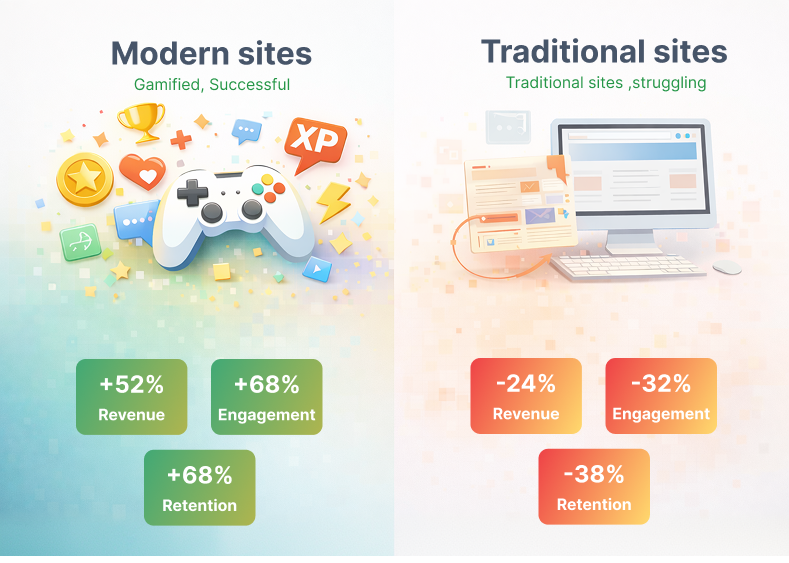
Sites using gamification see:

  • 180-250% higher email signup rates
  • 35% better engagement metrics
  • 28% lower bounce rates
  • 40% more time on site

When something works this well, it stops being experimental. It becomes standard practice.


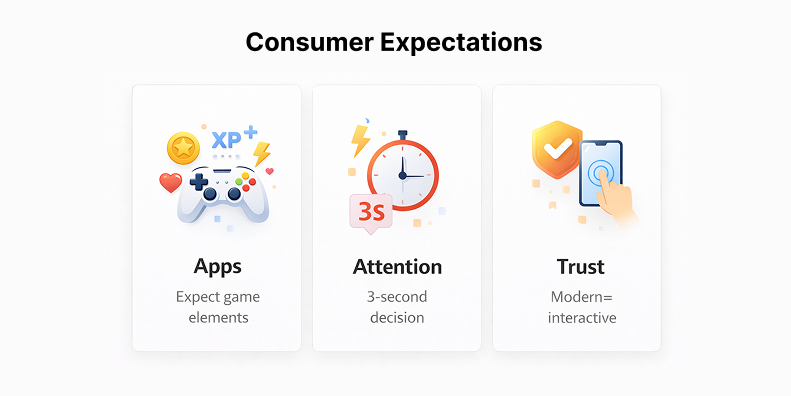
What Changed in Consumer Behavior

Here’s what’s really driving this shift: people’s expectations have changed.

We’re All Trained by Apps Now

Think about the apps you use every day. Duolingo gives you streaks and achievements. Starbucks has a rewards game. Even your fitness tracker gamifies your steps.
Your brain has been trained to expect this kind of interaction. When you land on a website with just static content and boring forms, it feels outdated.
It’s like watching standard definition after you’ve gotten used to 4K. You notice the difference.

Attention Spans Are Shrinking

The average person now decides whether to stay on your site in 3 seconds. Three seconds.
Traditional websites lose people fast. But interactive elements – a spin wheel, a scratch card, a quick game – capture attention immediately.
It’s not that people can’t focus anymore. It’s that they won’t focus on something boring when interesting options are one click away.

Trust Signals Have Evolved

Ten years ago, having a professional-looking website was enough to build trust. Now? Everyone has a professional-looking website.
What builds trust now is engagement. If your site is interactive and responsive, it feels modern and legitimate. If it’s static and boring, it feels outdated – even if it’s beautifully designed


What the Big Players Are Doing

Let’s look at who’s already gone all-in on this.
Amazon: Their entire shopping experience is gamified. Lightning deals create urgency. Prime benefits feel like unlocking levels. Even product recommendations are framed as “customers also played this game.”
Shopify stores: The top-performing Shopify stores all use some form of gamification. Spin wheels for discounts. Progress bars for free shipping. Loyalty points. It’s everywhere.
SaaS companies: Slack gamifies onboarding. Trello uses achievement badges. Grammarly shows you weekly stats like a video game.
WordPress specifically: The biggest WordPress sites – WooCommerce stores, membership platforms, course sites – are all adding game mechanics.
These aren’t small experimental businesses. These are industry leaders with massive budgets for testing and optimization.
If they’re doing it, they’ve tested it extensively. And it works.

What This Means for WordPress Sites

WordPress powers 43% of all websites. That’s a huge chunk of the internet.And right now, most WordPress sites are still using 2020 tactics. Static content. Boring forms. No interaction beyond clicking links. That’s becoming a competitive disadvantage.

The Gap Is Widening

Sites with gamification are seeing better results across every metric. More signups. Better engagement. Higher conversions. Sites without it are falling behind. Not because they’re doing anything wrong – they’re just doing what everyone did five years ago.The gap between modern sites and traditional sites is growing every month.

It’s Easier Than Ever to Implement

Five years ago, adding gamification to WordPress meant hiring developers. Custom code. Expensive integrations. Weeks of work. Now? Install a plugin. Configure it. Done. Twenty minutes. The barrier to entry dropped to zero. Which means there’s no excuse not to try it.

Your Competitors Are Doing It

This is the uncomfortable truth. Your competitors are probably already testing this.
We see it constantly. A business asks us about gamification. We check their competitors. Three of them are already using it.
The question isn’t whether to add gamification anymore. It’s whether you can afford to be the last one in your industry to do it.

Real Examples from Different Industries

Let’s look at specific cases across different types of WordPress sites.

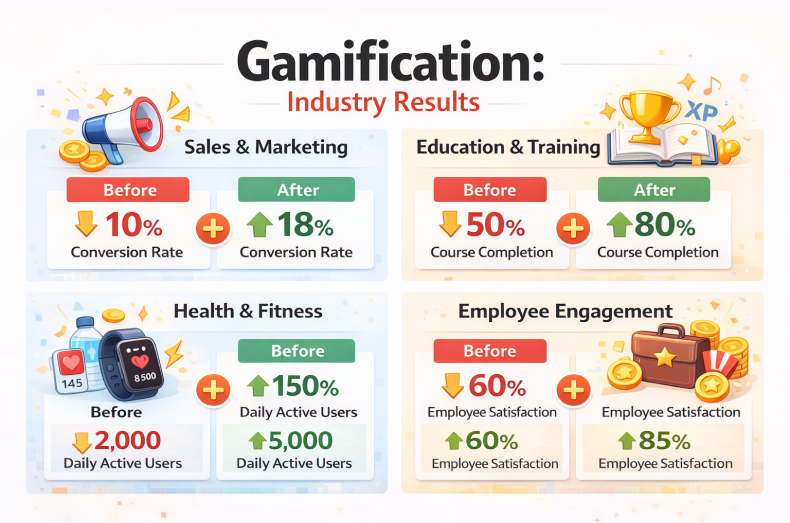
E-commerce (Fashion)

A clothing store added a spin wheel in January 2025. Before that, their email signup rate was 2.1%.
After gamification: 6.3%.
They went from adding 180 emails per month to 540 emails per month. Same traffic. Triple the signups.
Their conversion rate improved too. People who won a discount were 40% more likely to complete a purchase that day.

Blog (Parenting Advice)

A parenting blog added interactive quizzes and a prize wheel for their email course.
Time on site increased from 1:20 to 3:40. Engagement went up 175%.
But here’s the interesting part: ad revenue went up too. More time on site meant more ad impressions. They made 35% more from ads without changing anything else.

Service Business (Marketing Agency)

A marketing agency added a “spin for your free consultation topic” wheel to their contact page.
Lead quality improved. Because the wheel made choosing a consultation topic fun, more people actually completed the form.
Their lead-to-client conversion rate went from 12% to 19%. That’s massive for a service business.

Membership Site (Online Courses)

An online course platform gamified their onboarding. New members got achievement badges for completing lessons.
Course completion rates went from 23% to 47%. More than doubled.
And renewals improved by 30%. People who complete courses are more likely to stay subscribed.


What Makes Gamification Work in 2026

It’s not just about adding a game. It’s about understanding what makes it effective now.

It Has to Be Instant

People won’t wait. Your gamification needs to load fast and work immediately. No lag. No complicated instructions.
Spin wheel appears. They spin. They win. Done. The whole interaction takes 10 seconds.

It Has to Feel Fair

Everyone should win something. Even if it’s small. The “sorry, try again” approach doesn’t work anymore.
People are too savvy. They know when they’re being played. If your game feels rigged or unfair, it damages trust instead of building it.

It Has to Match Your Brand

A carnival-style spin wheel might work for a fun consumer brand. But for a B2B SaaS company? Probably not.
Your gamification needs to fit your brand personality. Professional brands need professional game mechanics.

It Has to Respect Privacy

This is huge in 2026. People are more aware of data privacy than ever.
Your gamification can’t feel manipulative or creepy. Don’t ask for unnecessary information. Be transparent about what you’re collecting and why.
The sites doing this well make it feel fun, not invasive.


The Technical Side (Simplified)

We talk to a lot of WordPress site owners who think gamification is complicated. It’s not.

It’s Literally a Plugin

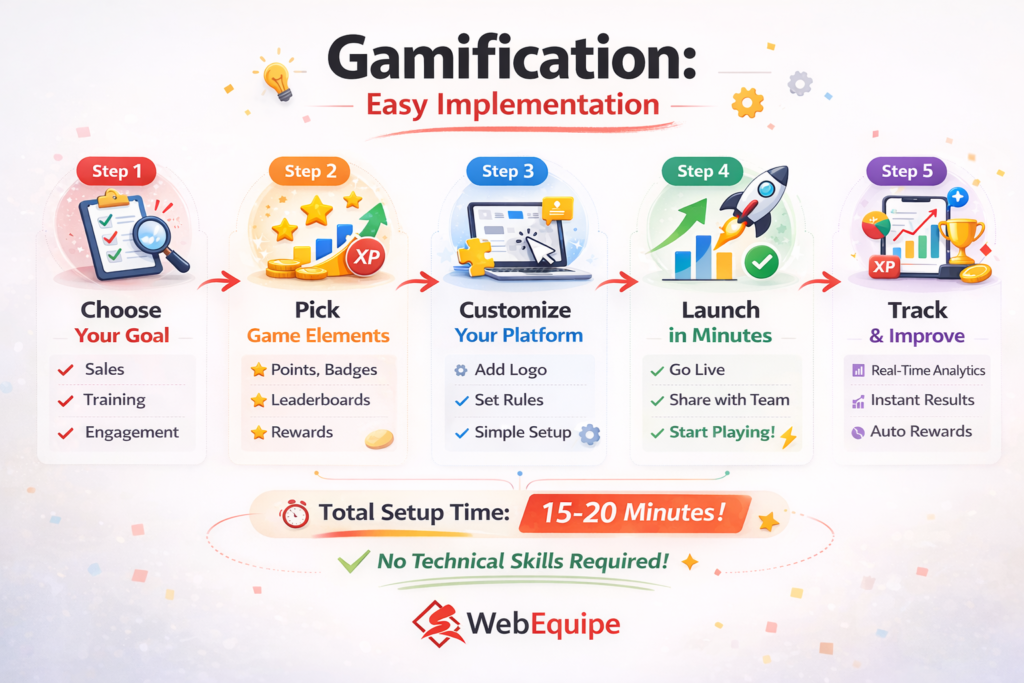
For most WordPress sites, adding gamification is as simple as:

  1. Install plugin
  2. Choose your game type (wheel, scratch card, etc.)
  3. Set your prizes or rewards
  4. Configure when it appears
  5. Match your design/colors

Total time: 15-20 minutes.

It Works With Everything

Modern gamification plugins integrate with:

  • WooCommerce
  • Popular email platforms (Mailchimp, ConvertKit, etc.)
  • Membership plugins
  • Analytics tools
  • Page builders

You don’t need to rebuild your site. You’re just adding an interactive layer on top.

It Won’t Slow You Down

One common worry: “Will this slow down my site?”
Not if you use a good plugin. Modern solutions are optimized. They load fast. They don’t impact your site speed.
We’ve tested this extensively with WebEquipe Spin & Win. No measurable impact on load times. No performance issues.

It’s Too Gimmicky

This was true in 2018. It’s not true in 2026.
Major brands use gamification. It’s mainstream now. When done professionally, it’s just good UX design.

My Audience Won’t Like It

We thought this about certain industries too. Professional services. B2B companies. Financial services.
We were wrong.
Every audience responds to well-designed interaction. The key is matching the style to your audience.

I Don’t Have Good Prizes to Offer

You don’t need expensive prizes. People respond to:

  • Small discounts (even 5% works)
  • Free shipping
  • Downloadable resources
  • Early access to content
  • Priority support

The “prize” doesn’t have to be huge. The interaction itself creates value.

It’s Just a Fad

Fads peak and die. Gamification has been growing steadily for five years. It’s not slowing down.
This is a fundamental shift in how websites work, not a temporary trend.


What Happens If You Don’t Adapt

Let’s be realistic about what happens if you ignore this.
Short term (2026): You’ll fall behind competitors who are using gamification. Your signup rates will be lower. Your engagement will be weaker.
Medium term (2027-2028): The gap widens. Sites with gamification will have built bigger email lists. More engaged audiences. Stronger customer relationships.
Long term (2029+): Gamification becomes expected. Sites without it feel outdated – like sites without mobile responsiveness feel now.
You can wait. But waiting just means more ground to make up later.

Getting Started with WebEquipe

This is why we’re so focused on making gamification accessible for WordPress sites.
We’ve spent three years building tools that make this easy. No coding. No complicated setup. No expensive developers.
WebEquipe Spin & Win Wheel gives you:

  • Multiple game types (wheel, scratch card, slots)
  • Full design customization
  • Built-in analytics
  • Integration with major email platforms
  • Mobile-optimized
  • Fast loading

It’s designed specifically for WordPress. Works with any theme. Integrates with WooCommerce. Takes minutes to set up.
The average improvement in signup rates is 215%.

Start Today. The best time to add gamification was two years ago. The second best time is today.

Install WebEquipe Spin & Win Wheel from the WordPress plugin directory. It’s free to start. No credit card needed.
Set up a basic wheel. Test it for two weeks. Check your numbers.
If it works (it probably will), you’re ahead of the curve. If it doesn’t, you spent 20 minutes finding out.

Gamification isn’t experimental anymore. It’s not a nice-to-have. It’s rapidly becoming standard.
Sites using it see dramatically better results. Sites without it are falling behind.
The adoption curve is steep. We’re watching it happen in real-time across thousands of WordPress sites.
Your choices are simple:

  1. Adapt now and stay competitive
  2. Wait and play catch-up later
  3. Ignore it and watch your competitors pull ahead

We know which option makes sense.
The question is: are you ready to be part of this shift, or are you going to watch it happen from the sidelines?

Resources

Get Started:

Explore Other Products

Spin & Win Wheel - Product
Live
Plugin WordPress

Spin & Win Wheel

Spin-to-win gamified lead capture

  • Fully customizable spin wheel
  • Smart discount and reward system
  • Built-in email and lead capture
PDF Search Pro - Product
Live
Plugin WordPress

PDF Search Pro

Built for real sites with real documents

  • Full-text PDF content search
  • Bulk index / unindex / exclude actions
  • Dedicated short code search page
Hello Vacancy - Product
Live
AI Micro SaaS

Hello Vacancy

AI-powered free hiring platform

  • AI candidate matching
  • Automated hiring pipeline
  • Free modern ATS platform
PostAll Social - Product
Live
AI Automation

PostAll Social

Write once, publish everywhere — automate social media.

  • Cross-platform publishing made simple
  • AI-assisted content generation & optimization
  • One-click scheduling & automation