
PDF Embedder is the better choice when you need to display a PDF on a page. WebEquipe PDF Search is the better choice when visitors need to find the text inside your PDFs. So the PDF Embedder vs WebEquipe PDF Search question isn’t about which plugin is stronger.
It’s about which job you need done. PDF Embedder puts a readable viewer inside your posts, built on Mozilla’s pdf.js. WebEquipe PDF Search reads the text of every PDF in your Media Library and adds it to search.
That’s the core split: presentation versus findability. A quick comparison table comes first, then a closer look at how each plugin works. You’ll see which one searches inside PDFs, which reads scanned files and how AI is changing PDF plugins.
After that, the guide compares viewing, access control, setup and pricing. PDF Embedder Premium starts at $29.50 for the first year. WebEquipe PDF Search is free, with paid plans from $89 per year.
By the end, you’ll know which plugin fits your site, or whether you need both.
What Is the Difference Between PDF Embedder and WebEquipe PDF Search?
The main difference between PDF Embedder and WebEquipe PDF Search is the job each one does. PDF Embedder is a PDF viewer plugin that displays one PDF inside a post or page.
WebEquipe PDF Search is a PDF search plugin. It indexes the text inside your Media Library PDFs so WordPress search can find them by content.
One plugin handles presentation, and the other adds a search layer. They solve different problems, so both can run on the same site.
Verdict: Pick PDF Embedder to show a document. Pick WebEquipe PDF Search to make every document findable.
What Is PDF Embedder?
PDF Embedder is a free WordPress plugin that displays PDF files inside your posts and pages. It’s a self-hosted viewer built on Mozilla’s pdf.js.
You embed a file with the PDF Embedder block or the [pdf-embedder] shortcode. Visitors get Next and Previous buttons, zoom and a toolbar you can position.
The plugin has 300,000+ active installs and a 4.7 out of 5 rating from 529 reviews. PDF Embedder Premium is sold on wp-pdf.com in Basic, Plus, Pro and Elite plans.
What Is WebEquipe PDF Search?
WebEquipe PDF Search is a WordPress plugin that makes the full text of your PDFs searchable. It indexes each file on upload and adds that text to native WordPress search. The
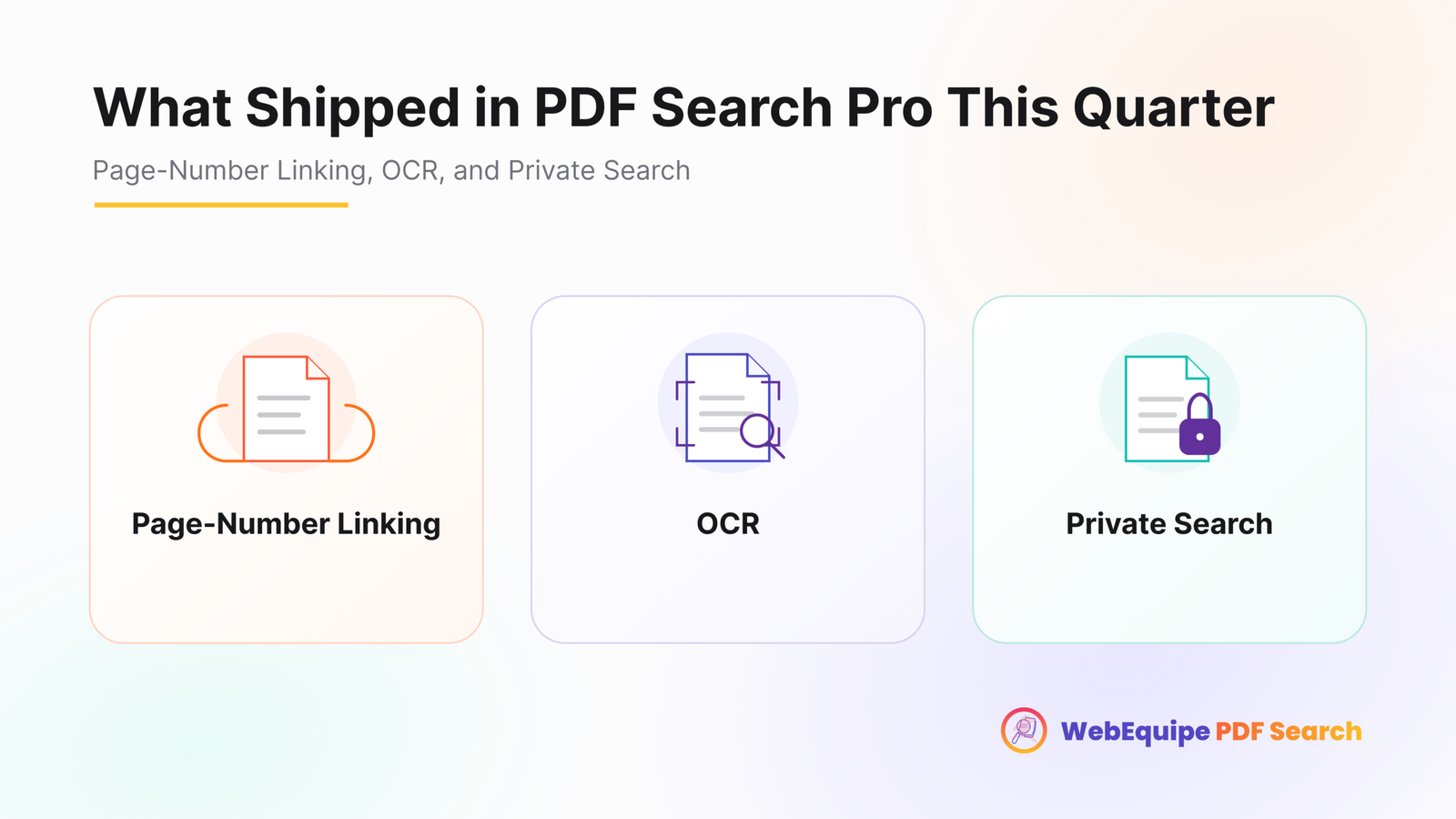
Each result shows the PDF title, a matching excerpt, the file size and the page count. The free plugin handles text-based PDFs, and PDF Search Pro adds OCR, private search and analytics.
On WordPress.org, it has 200+ active installs and a 5 out of 5 rating from 3 reviews.
How Do PDF Embedder and WebEquipe PDF Search Compare at a Glance?
PDF Embedder wins on viewing, and WebEquipe PDF Search wins on finding content inside PDFs.
The key differences between PDF Embedder and WebEquipe PDF Search are given in the table below.
| Feature | PDF Embedder | WebEquipe PDF Search |
| Main purpose | Displays a PDF on a page | Makes PDF text searchable |
| Free version | Yes, viewer with toolbar and zoom | Yes, indexes text-based PDFs |
| Search inside PDFs | Open PDF only, Premium | All indexed PDFs, free |
| PDF text in site search | No, file names and titles only | Yes, native search and shortcode |
| OCR for scanned PDFs | Not listed | Google Vision OCR, paid plans |
| Result links to the matching page | Not applicable | Page-number linking, paid plans |
| Viewer features | Premium adds download and scroll | DearFlip viewing, paid plans |
| Content protection | Secure PDFs and watermarks, Pro | Exclude, Include and Private PDF Search |
| Starting paid price | $29.50 first year, renews at $59 | $89 per year |
| Money-back guarantee | 14 days | 7 days |
Try WebEquipe PDF Search free. Install it from WordPress.org and make your first PDFs searchable in minutes.
How Do PDF Embedder and WebEquipe PDF Search Work?
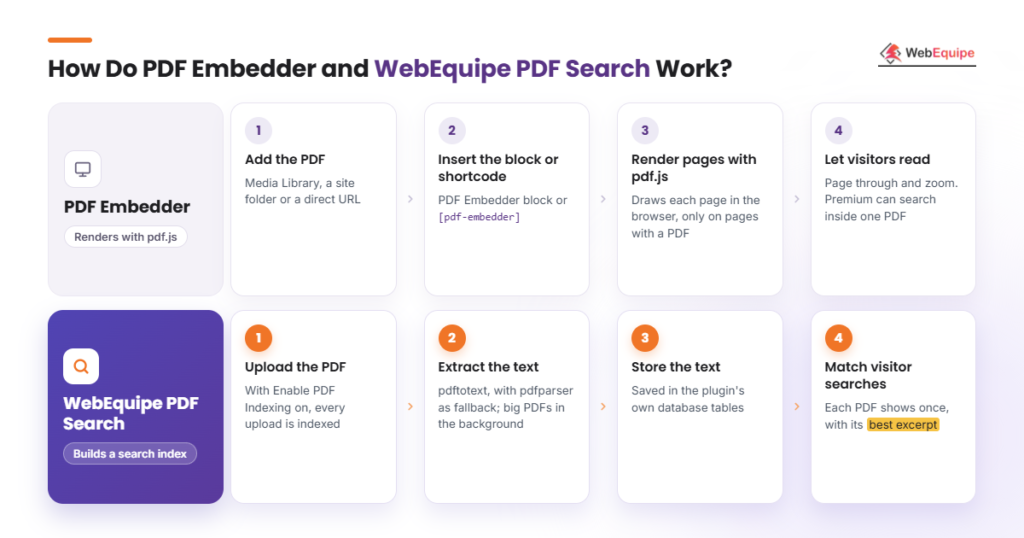
PDF Embedder works by rendering a PDF inside a page with a pdf.js viewer. WebEquipe PDF Search works by extracting the text of each PDF into a search index.
4 steps of how PDF Embedder displays a PDF are given below.
- Add the PDF. Use the Media Library, another folder on your site or a direct URL.
- Insert the block or shortcode. Add the PDF Embedder block, or use the [pdf-embedder] shortcode in a page builder.
- Render the pages with pdf.js. The viewer draws each page in the browser, loading only on pages with a PDF.
- Let visitors read. Readers page through and zoom. Premium users can also search inside that one PDF.
4 steps of how WebEquipe PDF Search makes PDFs searchable are given below.
- Upload the PDF. With “Enable PDF Indexing” turned on, each new upload gets indexed automatically.
- Extract the text. Poppler’s pdftotext reads the text, with smalot/pdfparser as a fallback. Large PDFs are processed page by page in the background.
- Store the text. Extracted text goes into the plugin’s own database tables, ready for search.
- Match visitor searches. Queries run against that stored index through WordPress search or the shortcode. Each PDF shows once, with its best-matching excerpt.
One plugin renders a file, and the other builds an index of every file. Our WordPress PDF search guide covers indexing in depth.
Which Plugin Lets Visitors Search Inside PDFs?
WebEquipe PDF Search lets visitors search inside every PDF from the site search. PDF Embedder Premium only searches inside the one PDF open in its viewer.
In-viewer search works like Ctrl+F for one document, so readers must find the right file first. Site-wide full-text search checks every PDF at once.
PDF Embedder’s “Search Text in PDFs” feature comes with the Basic plan and up. The free plugin has no full-text search.
PDF Embedder doesn’t add PDF text to site search either. Its docs share a PHP snippet for attachment pages, which matches only file names and titles.
WebEquipe PDF Search builds a free full-text index, with optional exact phrase matching. Paid plans add a PDF-only mode and filters for date, file size, page count, category and author.
Paid plans also offer page-number linking in search results. On Pro and Agency, analytics show top queries and zero-result searches. Those zero-result searches are gold, because they show what visitors can’t find.
The search features of both plugins are compared in the table below.
| Search feature | PDF Embedder | WebEquipe PDF Search |
| Search scope | One open PDF | Every indexed PDF |
| Plan needed | Premium Basic and up | Free |
| Exact phrase matching | Not listed | Yes, optional |
| Filters and PDF-only mode | Not listed | Starter plan and up |
| Search analytics | View and download counts | Top and zero-result queries |
Winner for searching PDF content: WebEquipe PDF Search. Here’s how to search inside PDF files across your whole site.
Can PDF Embedder or WebEquipe PDF Search Read Scanned PDFs?
Only WebEquipe PDF Search can read scanned PDFs, because its paid plans run OCR on image-based pages. PDF Embedder lists no OCR feature.
A scanned PDF is a picture of a page with no text layer. Until optical character recognition turns that picture into text, search has nothing to match.
WebEquipe uses Google Vision OCR in 50+ languages, with auto OCR on upload and a bulk OCR scan. Monthly quotas are 1,000 pages on Starter, 3,000 on Pro and 10,000 on Agency.
The free version indexes text-based PDFs only. Image-only PDFs are marked Error, and mixed PDFs get a warning. PDF Embedder still displays a scanned PDF, but its words stay unsearchable.
Quick test: if you can’t highlight and copy the text, the PDF needs OCR. You can then make scanned PDFs searchable in a few steps.
How Is AI Changing WordPress PDF Plugins?
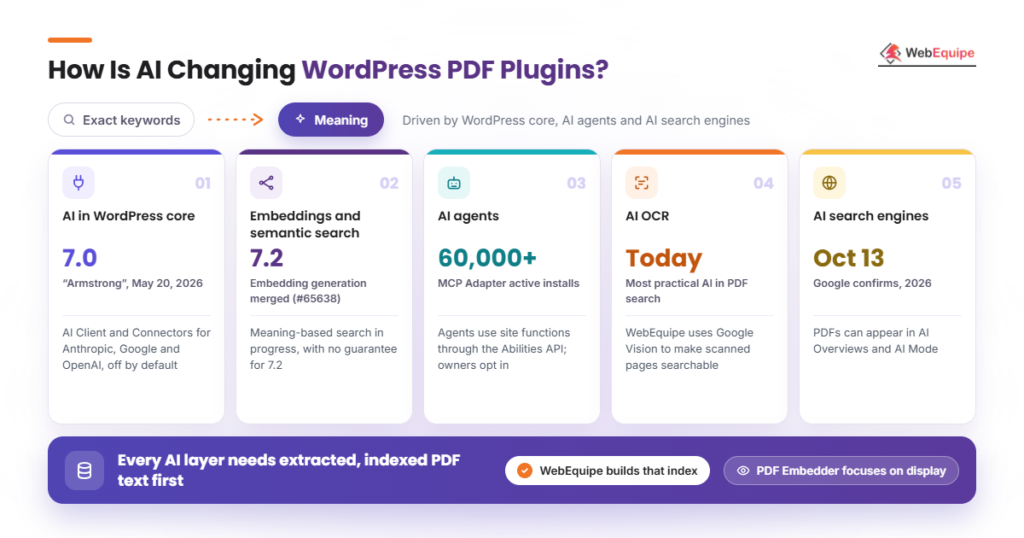
AI is changing WordPress PDF plugins by moving search from exact keywords toward meaning. It’s also turning PDF content into something AI tools and agents need to read.
The changes come from WordPress core, AI agents and AI search engines. Each one rewards indexed PDF text.
5 AI changes that affect PDF plugins in WordPress are outlined below.
- AI in WordPress core. WordPress 7.0 “Armstrong” shipped on May 20, 2026, with the AI Client and a Connectors screen. It connects Anthropic, Google and OpenAI, with nothing enabled by default.
- Embeddings and semantic search. Embedding generation was merged for WordPress 7.2 in Trac ticket #65638. Meaning-based search is being built in the AI plugin, with no guarantee for 7.2 in December.
- AI agents. The Abilities API and the MCP Adapter plugin let AI agents use site functions. The adapter has 60,000+ active installs, and owners opt in to each ability.
- AI OCR. Machine-read text is the most practical AI feature in PDF search today. WebEquipe PDF Search uses Google Vision to make scanned pages searchable.
- AI search engines. Google said on October 13, 2026, that PDFs can appear in AI Overviews and AI Mode. Readable PDF text now matters beyond your own site.
Neither plugin lists a generative AI chat or semantic search feature today. But any AI layer needs extracted, indexed PDF text first. WebEquipe’s index is that foundation, while PDF Embedder focuses on display.
Which Plugin Offers Better PDF Viewing and Access Control?
PDF Embedder offers the better on-page viewing experience. WebEquipe PDF Search offers more control over which PDFs appear in search.
PDF Embedder. The free responsive viewer puts the toolbar at the top, bottom, both or neither. It shows on hover or stays fixed, with custom width and height.
Premium adds downloads, working links, continuous scroll, mobile full-screen mode, jump to page and an Elementor widget.
Pro and Elite add Secure PDFs, which block direct file access and disable right-click. They also add dynamic watermarks with the viewer’s name, email or IP. Elite adds automatic thumbnails.
WebEquipe PDF Search. Results show an icon, file size, page count, excerpt and thumbnails. Starter and higher plans let visitors view PDFs in the DearFlip viewer.
You can exclude or include any file from search for free. Pro and Agency add Private PDF Search, which shows chosen PDFs to logged-in users only. That’s how you hide PDFs from search while members still find them.
Winner for viewing: PDF Embedder. Winner for search access control: WebEquipe PDF Search.
Which Plugin Is Easier to Set Up?
Both plugins take a few minutes to set up. PDF Embedder is set up per page, while WebEquipe PDF Search is set up once.
PDF Embedder needs a small step for each document. WebEquipe needs one round of settings, then runs in the background.
The setup steps and requirements of each plugin are given below.
- PDF Embedder setup. Install and activate the plugin, then add the PDF Embedder block and pick your file. Set site-wide defaults under Settings > PDF Embedder.
- WebEquipe PDF Search setup. Install it, turn on Enable PDF Indexing and Enable Search Integration, then click Re-index All PDFs. Add the search shortcode for a separate box.
- Requirements. PDF Embedder needs WordPress 6.6+, and WebEquipe needs WordPress 6.2+. Both need PHP 7.4+ and are tested up to 7.1.4.
- Page builders and networks. PDF Embedder works in Divi, Beaver Builder, Bricks and Elementor through its shortcode. WebEquipe’s shortcode works on any page and supports WordPress Multisite.
Our PDF search setup checklist walks through each setting in order.
How Much Do PDF Embedder and WebEquipe PDF Search Cost?
PDF Embedder Premium costs $29.50 to $129.50 for the first year. WebEquipe PDF Search is free, with paid plans from $89 per year.
PDF Embedder sells viewer licenses by site count, and first-year prices renew at full price. WebEquipe’s PDF Search Pro plans are priced by sites and OCR pages, with monthly billing from $7.
The pricing plans of PDF Embedder and WebEquipe PDF Search are shown in the table below.
| Plugin | Plan | Price | Sites | Main features added |
| PDF Embedder | Basic | $29.50, renews at $59 | 1 | Text search, download, links |
| PDF Embedder | Plus | $49.50, renews at $99 | 5 | Page gaps, hide annotations |
| PDF Embedder | Pro | $79.50, renews at $159 | 20 | Secure PDFs, watermarks |
| PDF Embedder | Elite | $129.50, renews at $259 | 100 | Automatic thumbnails |
| WebEquipe | Free | $0 | 1 | Full-text search, auto indexing |
| WebEquipe | Starter | $89/yr | 1 | 1,000 OCR pages, filters |
| WebEquipe | Pro | $169/yr | 5 | 3,000 OCR pages, private search |
| WebEquipe | Agency | $529/yr | Unlimited | 10,000 OCR pages, white-label |
So the cheaper choice depends on the job. For search alone, WebEquipe’s free plan may be all you need.
Which Plugin Should You Choose?
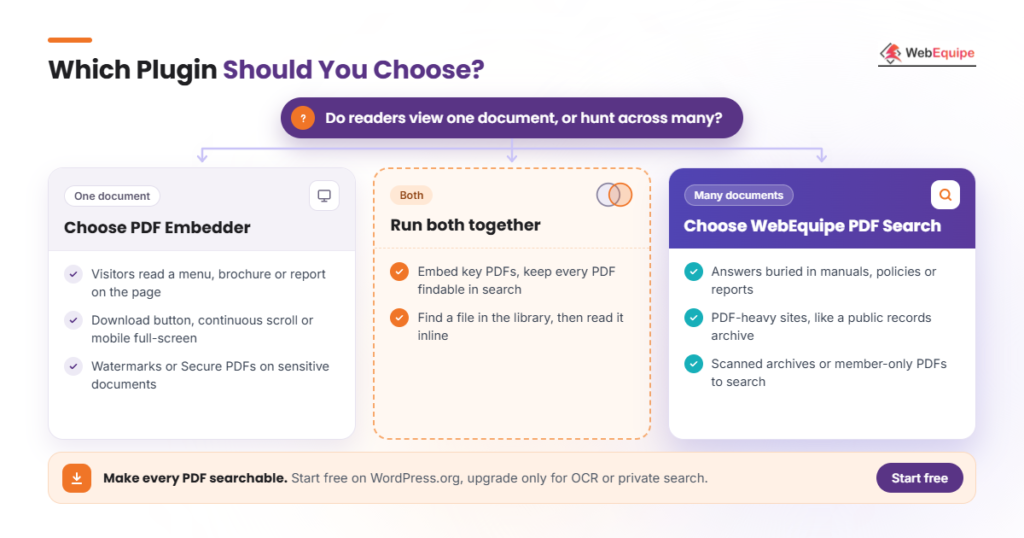
Choose PDF Embedder if you need to display PDFs inside your pages. Choose WebEquipe PDF Search if visitors need to find information inside your PDFs.
The best fit depends on whether readers view one document or hunt across many.
The signs that PDF Embedder fits your site are given below.
- Visitors should read a menu, brochure or report without leaving the page.
- You need a download button, continuous scroll or mobile full-screen viewing.
- You want watermarks or Secure PDFs on sensitive documents.
The signs that WebEquipe PDF Search fits your site are outlined below.
- Visitors look for answers buried inside manuals, policies or reports.
- You run a PDF-heavy site, such as a public records archive.
- You have scanned archives or member-only PDFs to make searchable.
The cases for running both plugins together are shown below.
- You embed key PDFs but want every PDF findable through search.
- Readers find a file in your document library, then read it inline.
For more options, see the best PDF search plugins.
Make every PDF on your site searchable. Start with the free plugin on WordPress.org, and upgrade only when you need OCR or private search.
Can WordPress Search Inside PDF Files Without a Plugin?
No, WordPress can’t search inside PDF files without a plugin. Its built-in search only checks the file title and description.
The words inside a PDF never reach the database that WordPress search reads. Even PDF Embedder’s attachment page snippet matches only names and titles. A plugin must extract and index the text first.
Our fix guide for search not finding PDFs explains the problem step by step.
Can You Use PDF Embedder and WebEquipe PDF Search Together?
Yes, you can use PDF Embedder and WebEquipe PDF Search together. One displays PDFs, and the other indexes them, so there’s no conflict.
WebEquipe indexes PDFs in the Media Library, where PDF Embedder usually pulls files from. So one file can sit in a viewer and appear in search. Test on a staging site to see where results send visitors.
Do PDF Plugins Slow Down WordPress?
No, neither plugin should noticeably slow down WordPress, because both keep heavy work off normal page loads.
PDF Embedder adds nothing to pages without a PDF, and it calls no third-party services. WebEquipe indexes in the background with WordPress cron, then searches a stored database index.
Still, indexing many large PDFs at once can raise server load, so check your hosting resources.
Can Either Plugin Index Password-Protected PDFs?
No, neither plugin can index password-protected PDFs, because encrypted text can’t be read without the password.
WebEquipe asks you to remove the password and re-upload the file, and it lists support as coming soon. PDF Embedder doesn’t index PDF text at all.
Encrypted files are one of several PDFs WordPress can’t index.
Do Embedded PDFs Help SEO and AI Search Visibility?
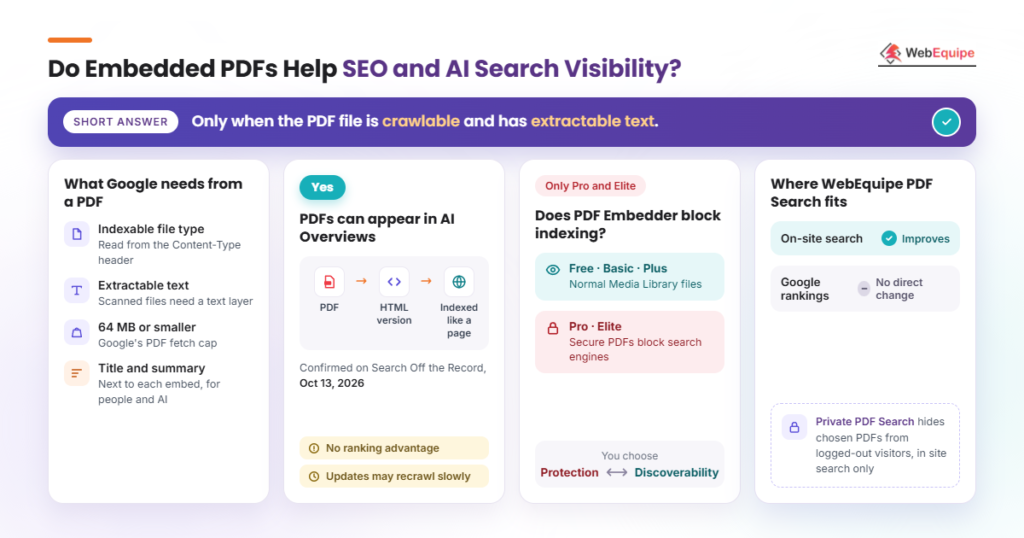
Embedded PDFs help SEO only when the PDF file is crawlable and has extractable text. Google lists Adobe Portable Document Format among its indexable file types. It reads the file type from the Content-Type header.
WebEquipe PDF Search improves on-site search, but it doesn’t change Google rankings directly. Add a descriptive title and summary next to each embedded PDF for people and AI tools.
Do PDFs Appear in Google AI Overviews?
Yes, PDFs can appear in Google AI Overviews and AI Mode. Google turns each PDF into an HTML version and indexes it like a web page.
Martin Splitt and John Mueller confirmed this on Google’s Search Off the Record podcast on October 13, 2026. Still, being a PDF gives no ranking advantage, and updates may be recrawled slowly.
Google also caps PDF fetches at 64 MB, and scanned files need a text layer.
Does PDF Embedder Stop Search Engines From Indexing PDFs?
Yes, but only on PDF Embedder’s Pro and Elite plans. There, Secure PDFs block search engines from indexing your documents.
The free, Basic and Plus versions leave PDFs as normal Media Library files. So you’re choosing protection or discoverability.
WebEquipe’s Private PDF Search works differently. It hides chosen PDFs from logged-out visitors in site search only.
Are Premium PDF Plugins Worth It?
Yes, premium PDF plugins are worth it when the free version lacks the one feature you need.
PDF Embedder Premium earns its price if you need downloads, working hyperlinks, in-viewer search or watermarks. WebEquipe’s paid plans suit scanned archives, member-only PDFs or analytics. Text-based PDFs are already searchable on the free plan.
How Many OCR Pages Does a PDF-Heavy Site Need?
Count your scanned pages, not your files, to estimate OCR needs. Text-based PDFs use no OCR pages at all.
Then split the count into a one-time backlog of old scans and new monthly scans. A big backlog may take months to clear on Starter. Our guide on how many OCR credits you need covers the math.
What Happens When a PDF Embedder License Expires?
When a PDF Embedder license lapses, you lose support and plugin updates. Licenses renew automatically every year, and renewals are charged at full price.
Cancelling also ends your locked-in pricing. The pricing page doesn’t say whether Premium features keep working, so ask wp-pdf.com first.
WebEquipe plans can be cancelled anytime, and the free plugin stays free.
What Are the Pros and Cons of PDF Embedder and WebEquipe PDF Search?
PDF Embedder’s biggest strength is its proven viewer, while WebEquipe’s is free full-text search.
The pros and cons of PDF Embedder and WebEquipe PDF Search are given in the table below.
| PDF Embedder pros | PDF Embedder cons | WebEquipe PDF Search pros | WebEquipe PDF Search cons |
| Large user base, 4.7 rating | Free version lacks download button | Free full-text PDF search | Smaller install base so far |
| Free self-hosted pdf.js viewer | Search covers one open PDF | Auto indexing on upload | Not a viewer on its own |
| Block plus builder shortcode | No OCR listed | Works with native search | No password-protected PDFs yet |
| Premium adds scroll and links | Secure PDFs need Pro | Google Vision OCR, paid plans | Monthly OCR page quotas |
| Pro adds dynamic watermarks | Full-price renewals | Private search and analytics | Shorter 7-day refund window |
PDF Embedder is the stronger viewer, and WebEquipe PDF Search is the stronger search layer.
How Do PDF Embedder and WebEquipe PDF Search Compare With Other PDF Plugins?
PDF plugins fall into five categories: viewers, search plugins, document libraries, flipbooks and site search engines. The comparisons below place each plugin in its category. For the library side, see our list of WordPress PDF library plugins.
What Is the Difference Between a PDF Viewer Plugin and a PDF Search Plugin?
A PDF viewer plugin displays a document, while a PDF search plugin indexes document text. A viewer shows one PDF at a time with a toolbar. A search plugin covers every PDF on the site and lists matches on a results page.
What Is the Difference Between PDF Embedder and EmbedPress?
Both are viewers, but PDF Embedder handles PDFs only. EmbedPress embeds content from many sources and adds 3D flipbooks. PDF Embedder has 300,000+ active installs, while EmbedPress has 100,000+.
What Is the Difference Between WebEquipe PDF Search and SearchWP?
SearchWP is a paid site-wide search engine where PDF text is just one source. It reads PDFs through Document Content and PDF Metadata attributes, tuned with relevance sliders. WebEquipe PDF Search is a PDF-focused SearchWP alternative with a free tier and built-in OCR on paid plans.
Frequently Asked Questions
Is WebEquipe PDF Search free?
Yes, WebEquipe PDF Search is free on WordPress.org. The free version indexes text-based PDFs and adds them to native search. You only pay for OCR, private search, filters or analytics.
Does PDF Embedder work with Elementor?
Yes, PDF Embedder works with Elementor. In the free version, you place the shortcode inside Elementor’s Shortcode widget. Premium adds a dedicated Elementor widget, so no shortcode is needed.
Can PDF Embedder show a PDF hosted on another site?
Yes, PDF Embedder can show an externally hosted PDF through a direct PDF link. Sharing or preview pages won’t work, and the remote host must allow fetching.
Which languages does WebEquipe PDF Search support?
WebEquipe PDF Search supports five interface languages and 50+ OCR languages. The interface comes in English, French, German, Dutch and Swedish. On paid plans, OCR reads scanned text in all 50+ languages.
Final Thoughts on PDF Embedder vs WebEquipe PDF Search
PDF Embedder and WebEquipe PDF Search do different jobs: display versus discovery. PDF Embedder puts a document in front of a reader. WebEquipe PDF Search makes sure readers can find it in the first place.
As AI search grows, indexed PDF text only gets more valuable. A PDF nobody can search is a PDF nobody reads.
Ready to make your PDFs searchable? Install the free plugin or compare the pricing plans and start indexing today.